Choosing the right car diagnostic scanner helps drivers, DIYers, and pros quickly identify why check engine lights come on, read fault codes, and monitor live data. This guide reviews five strong options, balancing ease of use, depth of diagnostics, and value. Each product below is linked to its Amazon listing for quick access.
Overview Of The Chosen Scanners
| Brand | Model | Main Strength | OBD Coverage |
|---|---|---|---|
| ANCEL | AD310 Classic Enhanced | Fast readings; compact and durable | OBDII / CAN |
| BlueDriver | Bluetooth Pro | Mobile-friendly; extensive error code library | OBDII; 1996+ |
| FOXWELL | NT301 | Ease of use; live data graphing | OBDII |
| FOXWELL | NT604 Elite | 5-in-1 diagnostics; ABS/SRS/transmission | OBDII + ABS/SRS |
| BLCKTEC | 460T | 12+ reset functions; real-time data | OBDII + OEM data |
ANCEL AD310 Classic Enhanced OBD II Scanner

The ANCEL AD310 is a compact, widely used OBD II scanner designed for quick fault code reading and clearing. It provides emission-related code checks, live data readouts, freeze frame data, and I/M readiness. Its portable design and straightforward operation make it a practical choice for home diagnostics and quick repairs.
Features support fast diagnosis without external power; it draws power directly from the vehicle’s OBDII port. Users benefit from a clearly labeled keypad and a readable display, enabling fast interpretation of results in a workshop or driveway setting.
BlueDriver Bluetooth Pro OBDII Scan Tool
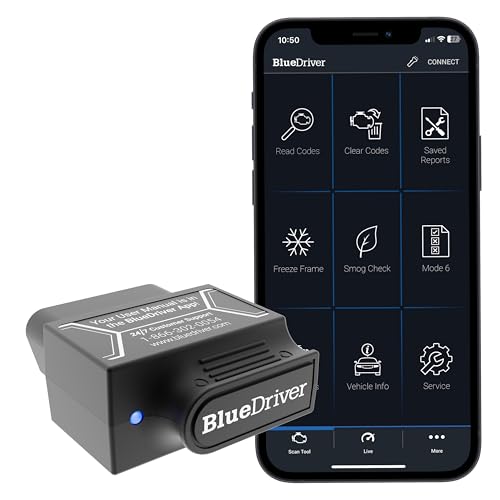
BlueDriver offers a subscription-free, mobile-first approach to car diagnostics. It reads and clears codes across engine, ABS, SRS, and more, and provides repair reports with possible causes and fixes. Real-time health monitoring and unlimited repair data make it a robust choice for ongoing vehicle maintenance and analysis on the go.
Users gain access to enhanced diagnostics via a connected app, enabling code reading from iPhone or Android devices. It delivers a user-friendly experience with a focus on actionable insights beyond basic code reading.
FOXWELL NT301 OBD2 Scanner

The NT301 is a straightforward diagnostic tool focusing on reading DTCs, MIL control, and live data. While it’s a reliable basic scanner, it emphasizes ease of use and accurate fault code retrieval for cars that require quick checks. It does not support ABS or SRS resets, making it a solid option for essential diagnostics after repairs.
Users should note that clearing codes often requires repair completion; the device is designed to read and verify repairs rather than perform extensive bi-directional control.
FOXWELL NT604 Elite OBD2 Scanner

The NT604 Elite is a feature-rich 5-in-1 tool designed for both car owners and professionals. It covers ABS, SRS, engine, and transmission diagnostics, with live data streams, I/M readiness, data playback, and the ability to print results. It ships ready to use out of the box with current software.
While it provides extensive diagnostic coverage, it notes that it cannot perform certain maintenance tasks like resets that require repair completion. It offers a balanced mix of affordability and depth for multi-system scanning.
BLCKTEC 460T OBD2 Scanner

The BLCKTEC 460T provides professional-level diagnostics with 12+ reset functions and all-system diagnostic capabilities. It supports multiple OBD II modes, displays real-time data and freeze frame information, and includes OEM live data access for deeper analysis. Compatibility checks are recommended before purchase because feature availability varies by vehicle.
Its advanced reset options—such as oil maintenance, ABS bleeding, and TPMS relearn—make it suitable for workshops and serious hobbyists who want more than basic code reading and code clearing.
Buying Guide: Key Purchase Considerations
- Vehicle compatibility: Verify which models, years, and systems are supported. Some tools excel at engine codes, others cover ABS, SRS, or transmission.
- Diagnostics depth: Decide between basic code reading, live data streaming, VIN retrieval, I/M readiness, and advanced functions like ABS/SRS testing or OE-style reset capabilities.
- Data presentation: Look for clear DTC definitions, real-time data graphs, and data playback. A readable screen or a well-designed app helps interpret results quickly.
- Power and connectivity: Models that draw power from the OBD port are convenient. Bluetooth or Wi-Fi tools require pairing with a phone or tablet; ensure compatibility with your device.
- Software updates: Some tools offer free or paid updates to access new codes and features. Check update frequency and ease of updating the device.
- Usability: Consider tool size, build quality, button layout, and whether the interface suits beginners or seasoned users.
- Security and data access: For mobile tools, evaluate data privacy policies and whether diagnostic data can be stored securely and shared with shops.
- Budget vs. needs: Entry-level scanners cover essential codes; mid- to high-end tools add multi-system diagnostics and professional features. Align with your use case and maintenance plans.
- Warranty and support: A robust warranty and accessible customer support help if you encounter vehicle-specific compatibility questions.
- Car care goals: If you plan frequent diagnostics, prioritize tools with broader system coverage and live data capability; for occasional checks, a simpler reader may suffice.