Finding the right Android AI box for your car can upgrade driving experiences by enabling wireless CarPlay, Android Auto, and rich apps on the factory display. This guide highlights five top choices, comparing compatibility, performance, and key features to help you pick a model that fits your vehicle and needs. All options work with OEM wired CarPlay/Android Auto systems, offering plug‑and‑play setup where available and robust multimedia capabilities for on‑the‑go entertainment and navigation.
Summary of selected products
| Product | Brand | Key Features |
|---|---|---|
| AI Box Wireless CarPlay & Auto Adapter | FAIMEE | Wireless CarPlay/Android Auto, Android 12, Dual‑Band WiFi, Bluetooth 5.0, 4K video |
| ZYW Magic AI Box | ZYW | 4K streaming, WiFi 6, wired CarPlay/Android Auto compatibility, full Android 10 |
| LAMTTO 4‑in‑1 Wireless CarPlay Android Auto Adapter | LAMTTO | Wireless CarPlay/Android Auto, Google Play, remote control, Netflix/YouTube/TikTok |
| OneCarStereo CarPlay AI Box HE Pro | One Car Stereo | Qualcomm Octa‑core, Android 13, 8+128GB, 4G/SIM, OTA |
| ATOTOOUT Magic Box | ATOTOOUT | Android 13, 8GB/128GB, built‑in 4G/Wi‑Fi, GPS, AI |
AI Box Wireless CarPlay & Auto Adapter

The FAIMEE wireless CarPlay and Android Auto adapter upgrades wired CarPlay to wireless, supporting iPhone 7+ (iOS 10.0+) and Android 11+ phones. It runs Android 12.0 and includes 4GB RAM and 32GB storage, enabling Google Maps, streaming apps, and 4K video playback. Dual‑band WiFi (2.4GHz/5GHz) enhances connectivity for streaming and navigation, while Bluetooth 5.0 improves hands‑free calls and audio transfer. USB and SD card support expands media options. Installation is designed to be plug‑and‑play for compatible vehicles.
Key features to note: wireless CarPlay/Android Auto, multimedia streaming, robust connectivity, and expandable storage. Consider your vehicle’s compatibility with OEM wired CarPlay when planning installation.
ZYW Magic AI Box Wireless CarPlay Adapter

The ZYW Magic AI Box emphasizes lag‑free 4K streaming with a high‑performance processor and WiFi 6. It is built to operate reliably in extreme temperatures and is designed for vehicles with factory wired CarPlay/Android Auto. The device supports wireless CarPlay, wireless Android Auto, and a full Android 10.0 OS, with 32GB of storage. It requires verification of vehicle compatibility to ensure a smooth plug‑and‑play experience before purchase, especially for models with unique OEM setups.
Consider thermal design, app availability, and whether your car’s head unit matches the device’s wired CarPlay/Android Auto prerequisites. The device suits users seeking a durable, high‑performance in‑car entertainment upgrade.
LAMTTO 4‑in‑1 Wireless CarPlay Android Auto Adapter

The LAMTTO 4‑in‑1 box offers Wireless CarPlay and Android Auto along with Google Play access via Android. It preloads apps like Netflix, YouTube, and TikTok and includes a remote for front‑or back‑seat control, improving convenience on longer trips. The device uses Android with the ability to download apps from Google Play, providing a customizable entertainment experience. It is especially suitable for drivers who want a flexible in‑car entertainment system with remote operation capabilities.
Note the remote’s app limitations within Netflix or YouTube due to permissions. Compatibility with OEM wired CarPlay is a factor to confirm before purchase to ensure a seamless upgrade path.
OneCarStereo CarPlay Ai Box HE Pro
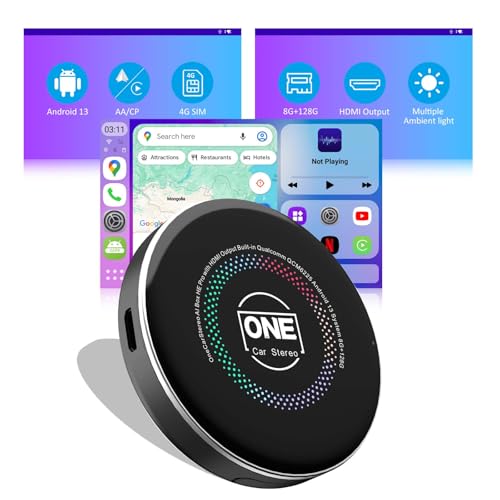
The HE Pro from OneCarStereo runs on a Qualcomm octa‑core chip and ships with Android 13, 8GB RAM, and 128GB storage. It supports wireless CarPlay and Android Auto, with options for 4G SIM and OTA updates, enabling YouTube, Disney+, and other apps. It emphasizes fast app loading, online content access via hotspot or in‑car Wi‑Fi, and smartphone assistant support. The device targets users seeking strong performance, large storage, and OTA updates for continued feature enhancements.
ATOTOOUT Magic Box

The ATOTOOUT Magic Box combines Android 13 with wireless CarPlay and Android Auto, plus built‑in 4G/Wi‑Fi/Bluetooth and 8GB RAM / 128GB storage. It includes GPS and AI features, microSD playback, OTA updates, and dual connectivity options for reliable online access on the road. This model supports a broad app ecosystem through Android and emphasizes OTA improvements to keep the system secure and current. It is best for users who want a feature‑rich, connected car infotainment upgrade with ongoing updates.
Buying Guide: Key Considerations and Comparisons
- Vehicle compatibility: Ensure the box works with your car’s OEM wired CarPlay or Android Auto system. Some models are not compatible with certain makes or models; verify before purchasing.
- Operating system and app availability: Android 12/13 options enable wider app access, including streaming services and maps. Consider how often OTA updates are provided and whether Google Play access is included.
- Connectivity: Dual‑band WiFi, WiFi 6, Bluetooth 5.0, and optional 4G/SIM support affect streaming stability and navigation reliability. If you frequently stream video or rely on online maps, prioritize strong wireless options.
- Performance and storage: CPUs ranging from mid‑range to octa‑core, plus RAM (2GB–8GB) and storage (16GB–128GB+) impact multi‑tasking and app availability. Larger storage reduces the need for constant app management.
- Installability and control: Some devices include remotes for rear seating or front‑seat control; others emphasize touch or voice AI assistants. Consider how passengers will interact with the system.
- AI features and voice assistants: Look for devices that offer AI assistants for driving tasks and entertainment control. Chat AI features can enhance safety by reducing screen time while driving.
- Video output and screen mirroring: If you use external displays or headrest screens, check for video output capabilities and restrictions on streaming content when casting to external displays.
- Storage limits and media formats: For offline media, verify supported formats and SD card or USB drive compatibility, including capacity limits (e.g., 128GB) and file type support.
- OTA updates and support: Regular updates help maintain security, compatibility, and feature access. Check the vendor’s update policy and response timelines.
Across these options, buyers should balance compatibility with their specific vehicle, desired app ecosystem, and how they value features such as remote control, AI assistants, or offline media. The best choice aligns with your car’s original infotainment capabilities, desired apps, and your preference for wireless CarPlay, Android Auto, or a full Android experience on the factory display.