For rear-seat passengers, a capable in-car entertainment system can transform long drives into enjoyable experiences. This article highlights five top picks that combine Android 13 capabilities, 4K or 4K-ready video, wireless screen mirroring, and versatile connectivity. Each option is designed to keep passengers entertained with streaming, games, and offline media, while offering easy installation and family-friendly features. Below, you’ll find quick product overviews, a comparison table, and a buying guide to help you choose the right headrest monitor setup for your vehicle.
Summary of Chosen Products
| Product | Brand | Screen Size | |
|---|---|---|---|
| 13.3″ Car TV Headrest Monitor | WONNIE | 13.3″ | Android 13, 4K playback, wireless mirror link |
| 16″ Car TV Headrest Monitor | WONNIE | 16″ | Android 13, OTA updates, wireless mirroring |
| 15.6″ Android Car TV Headrest | AINAVI | 15.6″ | Android 13, 4K playback, app store access |
| 15.6″ 4K Android Car TV Headrest | Seventour | 15.6″ | 4K support, wireless phone link, Android 11/OTA |
| 13.5″ Android Headrest Monitor | AINAVITO | 13.5″ | 4K decoding, AirPlay/Miracast, Android 13 |
13.3-Inch Android Headrest Monitor

WONNIE’s 13.3″ car TV headrest monitor provides a vivid IPS touchscreen with 1920×1200 resolution and 4K playback support. It runs Android 13, supports OTA updates, and offers seamless streaming via 5G/2.4 GHz WiFi or mobile hotspot. The device supports Miracast/AirPlay for wireless phone mirroring and includes MyCar Link for remote control, making it a comprehensive rear-seat entertainment hub for long trips.
16-Inch Car TV Headrest Monitor
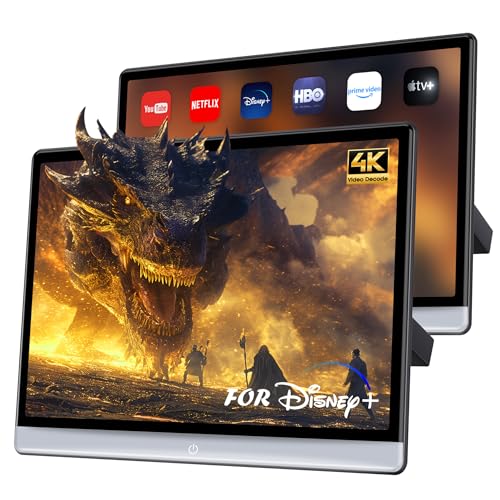
This 16″ headrest monitor from WONNIE combines a 1920×1200 IPS touchscreen with 4K playback support. It runs Android 13, includes OTA updates, and offers strong wireless capabilities via WiFi and Bluetooth. Mirroring supports both Android and iOS devices, while the MyCar Link app provides remote control, enabling easy content sharing for rear-row passengers on long drives.
15.6-Inch Android Car TV Headrest

The 15.6″ Android 13 car TV from AINAVI emphasizes app access via Google Play, 4K video playback, and a customizable wallpaper feature. It supports wireless screen mirroring, including AirPlay and Miracast, and uses the MyCar Link app for synchronized control between phone and display. The larger display makes it ideal for families seeking a feature-rich rear entertainment experience.
15.6″ 4K Android Car TV Headrest (Seventour)

This 15.6-inch Seventour model features an HD IPS touch screen with 1920×1080 resolution and 4K video decoding. It runs Android and supports 5G/2.4 GHz WiFi for streaming, plus wireless phone linking via Miracast and AirPlay. The MyCar Link app enables screen syncing and remote control, offering a practical blend of entertainment and convenience for backseat passengers.
13.5-Inch Android Headrest Monitor (AINAVITO)

The AINAVITO 13.5-inch headrest monitor emphasizes a 4K-capable decoding engine, along with wireless mirroring using AirPlay and Miracast. It runs Android 13 with Google Play access, and supports the MyCar Link app for synchronized control. This option targets users who want a theater-like experience with high-resolution playback on a sizable screen.
Buying Guide
- Display quality and size: Larger screens provide a more immersive experience, but consider vehicle headroom and seat spacing. Look for IPS panels for accurate colors and wide viewing angles.
- Operating system and apps: Android 13 or newer gives access to Google Play and a broad app ecosystem. Check OTA update support to keep software current.
- Connectivity: Ensure WiFi (5G/2.4 GHz), Bluetooth, HDMI, USB, and SD/microSD options align with your media sources and playback needs.
- Wireless mirroring: Miracast and AirPlay compatibility enable easy screen sharing from most smartphones. App-based remote controls (MyCar Link) add convenience.
- Storage and performance: 4G+64GB or similar configurations help with offline downloads and smooth multitasking. More RAM/ROM improves app performance and responsiveness.
- OTA updates and reliability: Automatic firmware updates extend device longevity and security, reducing the risk of obsolescence.
- Power and installation: Check wiring options, included mounts, and how the unit integrates with your vehicle’s headrest framework. Consider professional installation if necessary.
- Content considerations: Ensure the player supports common video formats (4K, MP4, MKV) and audio formats you frequently use. Parental controls can be a valuable feature for families.
These options provide a range of sizes, Android versions, and feature sets to suit different passenger needs and vehicle configurations. When choosing, balance screen real estate with ease of use, streaming capabilities, and compatibility with your household devices.