Today’s mobile work setup often hinges on a reliable laptop mount. The following selections are designed to fit trucks, SUVs, and vans, offering secure holds, easy adjustability, and cooling features to keep devices performing on long drives. This guide highlights five top options, comparing mounting methods, compatibility, and ergonomics so you can choose the right fit for your vehicle and work style.
| Product | Brand | Compatibility | Key Benefit |
|---|---|---|---|
| VIVO MOUNT-CAR01 | VIVO | Exposed floor seat bolts; trucks, vans, cars, SUVs | Full articulation; tall adjustable pole |
| SPIRRELAB Truck Laptop Mount (Ford) | SPIRRELAB | Chevy Silverado, GMC Sierra, Tahoe; no drilling | Wide vehicle compatibility; built-in cooling |
| RAM MOUNTS RAM-VB-195-SW1 | RAM MOUNTS | Ford F-Series 2015-2026; many others | No-drill, customizable tray; universal fit |
| Mount-It! Car Laptop Mount | Mount-It! | Trucks, vans, SUVs; wide laptop range | Full motion; locking joints |
| MELIPRON Truck Laptop Mount (Ford) | MELIPRON | Ford F-150/250/350/550; multiple trims | Dual cooling fans; no-drill install |
VIVO Single Laptop Car Mount
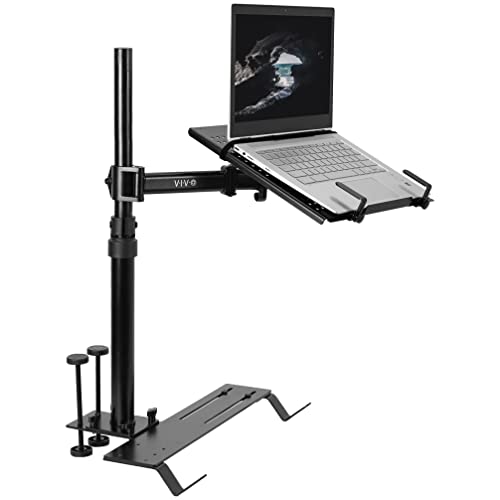
The VIVO MOUNT-CAR01 is designed for vehicles with exposed floor seat bolts, including trucks, vans, cars, and SUVs. It uses three different mounting feet to accommodate a range of bolt angles (0°, 90°, and 45° on the passenger side) for a stable workstation. The 36cm x 30cm tray holds laptops up to 43cm and 5kg, with a ventilated surface to improve cooling. Flexible tray clips secure devices, and the telescopic pole can extend from 47cm to 67cm. The arm offers 23cm of adjustment for a comfortable ergonomic setup. This model emphasizes secure anchoring and full articulation for personalized positioning.
SPIRRELAB Truck Laptop Mount (No-Drilling)

SPIRRELAB’s truck laptop mount targets a broad range of Chevy and GMC models from 2019 to 2025, along with no-drill installation that anchors to the passenger seat bolt. A 1.5″ ball joint and solid base provide stability on rough roads, while adjustable height (11.9″ to 20″) and up to 20″ arm reach let users tailor the viewing angle. Three locking joints enable quick setup and removal, making it suitable for varying drivers or shifts.
RAM MOUNTS No-Drill Laptop Mount

RAM MOUNTS RAM-VB-195-SW1 is a purpose-built, no-drill solution for Ford F-Series trucks and many other models. It uses a dual articulating swing arm to optimize placement, with a universal laptop tray that accommodates most 10″ to 16″ devices. Installation uses existing passenger seat bolts, avoiding vehicle modification while providing a secure, adjustable workspace that retains interior integrity.
Mount-It! Car Laptop Mount

Mount-It!’s solution provides a heavy-duty, no-drill mounting option for commercial and personal use in trucks, vans, and SUVs. It attaches to the bottom of the passenger seat rail and includes full-motion joints to enable precise laptop positioning. The universal tray supports laptops up to 17 inches and can hold tablets as well, with four adjustable clamps to secure the device during transit and on rough roads.
MELIPRON Truck Laptop Mount (Ford)

MELIPRON’s Ford-focused truck laptop mount fits 2015-2025 F-150 and up to 2025 F-550 models, with no drilling required by mounting to passenger seat track rails. It features adjustable height and a 360° rotatable tray, plus dual swing arms for extended reach. Two built-in cooling fans help prevent overheating during long drives, supporting device longevity and user comfort in hot vehicle environments. The design emphasizes compatibility with a wide range of Ford trucks and reliability in challenging road conditions.
Buying Guide
- Installation method: No-drill mounts preserve vehicle integrity, but some users may prefer bolt-based anchors for maximum stability. Consider whether your vehicle’s seat rails or floor bolts are accessible and compatible with the mount’s mounting feet.
- Weight capacity and device size: Check max load (generally 5 kg) and the laptop size range (often 10″–17″). Ensure your device fits securely with clamps and the tray design.
- Adjustability: Look for full articulation, height extension, and arm reach to tailor the viewing angle. For trucks with bumpy rides, a stable base and locking joints are essential.
- Cooling features: Built-in fans or ventilated trays help manage heat during long sessions, protecting hardware longevity and performance.
- Durability and materials: Aircraft-grade aluminum and steel bases offer stronger support, especially on high-speed or uneven roads. Plastic components should be high-strength and heat-resistant where used.
- Ease of transfer: Quick-release poles or removable trays can improve convenience when sharing a vehicle or switching drivers.
- Ergonomics: Prefer mounts with tilting, swiveling, and rotating capabilities to align the screen with your eye level and reduce neck strain during extended drives.
- Vehicle compatibility: Verify that the mount is designed for your truck model and seat bolt configuration. Some models list explicit compatibility with popular trucks like Ford F-Series, Chevy Silverado, or GMC Sierra.
When choosing a truck laptop mount, balance installation practicality with long-term usability. No-drill options are appealing for renters or fleet managers, while more rigid bolt-based solutions can provide added stability in rough terrain. Always confirm weight limits, adjustability, and cooling features to ensure the setup remains secure and ergonomic across different driving scenarios.