Choosing the right car LCD screen involves balancing size, compatibility, touch responsiveness, and ease of installation. This guide highlights five notable options that cover a range of use cases—from factory‑style replacement digitizers to portable, wireless CarPlay/Android Auto screens and rear‑view monitor displays. Each entry includes key features to help you compare reliability, display quality, and integration with your vehicle’s system.
Summary of chosen products
| Product | Brand | Display Size | Key Benefit | Amazon URL |
|---|---|---|---|---|
| TsuperU LCD Touch Screen Replacement DJ080PA-01A | TsuperU | 8 inch | OEM replacement for Chevy/GMC trucks; restores touch | Link |
| Largest 11.5 inch Wireless CarPlay Screen | Leadtree | 11.5 inch | Wireless CarPlay/Android Auto with apps and 1080P backup/navigation | Link |
| Portable Wireless Carplay Car Stereo, 7″ HD | Yongeid | 7 inch | Portable CarPlay/Android Auto with backup camera | Link |
| 17-22 Replacement 8.4″ Uconnect LCD Monitor | WonVon | 8.4 inch | Uconnect 4C UAQ touchscreen replacement | Link |
| Vehicle On-Dash 7″ Backup Monitor | Lychee | 7 inch | Rear‑view TFT LCD with 2 video inputs | Link |
TsuperU 8-Inch Touch Screen Replacement

The TsuperU DJ080PA-01A is an OEM‑style replacement digitizer for GM trucks and SUVs. It pairs an 8-inch LCD display with touch capability to restore functionality to cracked or unresponsive screens. The part fits multiple GM models including Silverado, Tahoe, Suburban, Colorado, and GMC variants through 2014–2019 ranges. Compatibility extends to the Dodge/GMC family where applicable, and the kit aims to sidestep dealer replacement costs by providing a straightforward screen and digitizer swap. A video guide is available to assist the installation process.
Core features include replacement part numbers DJ080PA-01A and related variants, broad GM and GMC compatibility, and a focus on restoring touch response without requiring radio replacement. It is designed to be a high‑value alternative to dealer options for 8‑inch GM infotainment screens.
What to consider
- Make sure the screen matches your model year and radio type for Chevy/GMC vehicles.
- Verify compatibility with your vehicle’s display connectors and the digitizer is included.
- Consult the included replacement video to assess DIY feasibility and required tools.
Leadtree 11.5-Inch Wireless CarPlay Screen
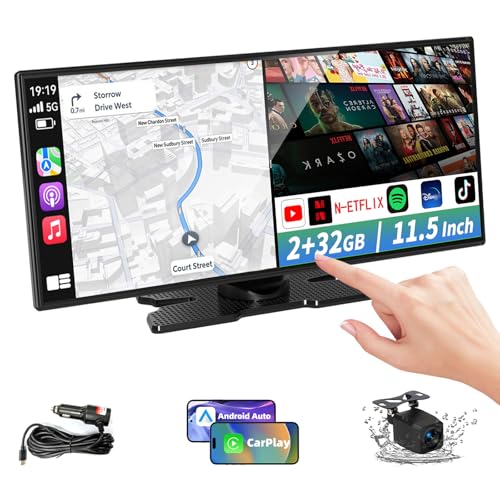
This large, all‑in‑one CarPlay/Android Auto entertainment unit uses an 11.5‑inch ultra‑wide display to deliver navigational maps, streaming apps, and media in high definition. The device runs Android 15 with 2GB RAM and 32GB storage, supporting popular apps such as YouTube, Netflix, and TikTok via wireless connectivity. It supports AirPlay and Android Cast, enabling content mirroring from a smartphone. The system emphasis is on ease of use, hands‑free operation with voice control, and a rich in‑car multimedia experience through a single installation.
Key aspects to evaluate include the screen size versus dash space, wireless integration quality, and whether the included navigation and backup camera features meet your daily driving needs. Consider power requirements, mounting options, and potential vehicle‑specific harness needs.
Practical considerations
- Ensure the vehicle’s electrical system can support the device’s voltage range and power consumption.
- Assess fitment within your dashboard and the need for any dashboard modification.
- Check compatibility with your existing backup camera and wiring harness.
Yongeid Portable Wireless Carplay 7-Inch

The Yongeid 7″ wireless CarPlay/Android Auto car stereo offers a portable, dashboard‑mountable solution that preserves the vehicle’s original radio. It supports 12V–24V input, making it adaptable to a wide range of vehicles, including trucks, campers, and vans. The device emphasizes wireless CarPlay connectivity, VOICE control, GPS navigation, and a backup camera option via included or add‑on components. The mounting kit with adjustable angles helps match various dashboard configurations without major installation.
Consider whether you want a semi‑permanent mount or a temporary add‑on that won’t alter factory radios. Assess the stability of the dash mount, the camera connectivity, and the reliability of wireless pairing in your typical driving environment.
Usage notes
- Confirm the vehicle’s 12V–24V power availability and fuse rating before installation.
- Evaluate how often you plan to remove or reposition the screen, since portability is a core feature.
- Test visibility and touch responsiveness in both daytime and night settings.
WonVon 8.4-Inch Uconnect LCD Monitor

The WonVon 8.4″ Uconnect LCD monitor is positioned as a replacement part for Chrysler, Dodge, RAM, and Jeep models with the 4C UAQ Uconnect system. It supports replacement of the LA084X01 family of screens (SL variants) and aims to restore touchscreen functionality, resolution, and in‑dash navigation display. The listing notes broad compatibility across several 2017–2022 models, including popular trucks and SUV lines, and references compatibility with multiple Uconnect configurations.
Consider the need for recalibration after installation and the potential requirement for professional assistance to ensure proper calibration of the digitizer and display. It is prudent to verify year‑model and trim compatibility prior to purchase.
Installation considerations
- Check the specific LA084X01 variant required for your radio model.
- Prepare for possible compatibility checks with the vehicle’s CAN bus settings.
- Ensure you have the correct tools for disconnecting and reconnecting the digital display assembly.
Lychee 7-Inch Vehicle On‑Dash Backup Monitor
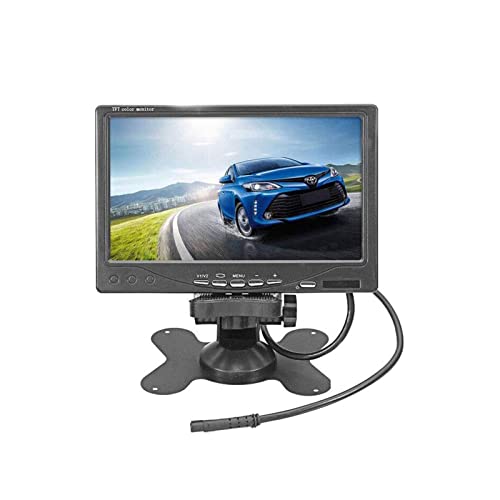
The Lychee 7″ digital HD car TFT LCD backup monitor provides 800×480 resolution with two video inputs for rear‑view camera integration. Its rotatable screen and 16:9/4:3 aspect options offer flexible viewing angles for various mounting positions. It comes with an IR remote control for simple operation and is designed to work with car DVD players, cameras, STBs, and similar video equipment, making it a versatile addition to any vehicle’s backup display setup.
Key evaluation points include image clarity for reversing, ease of mounting, and compatibility with existing cameras. Given its compact size, this monitor fits well in tight dash spaces but may have limited visibility in bright daylight unless mounted optimally.
Practical tips
- Test camera alignment and adjust the monitor angle to minimize glare.
- Consider cabling length and routing to avoid interference with dash controls.
- Ensure the monitor supports the input format from your backup camera.
BW 3.5 Inch TFT LCD Monitor
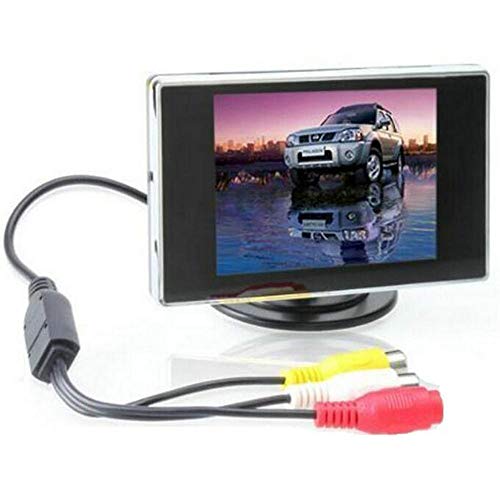
The BW 3.5 Inch TFT LCD Monitor is a compact, standalone display suitable for automotive use. It features a 3.5 inch TFT panel with a 4:3 aspect ratio and a DC 12V power supply. The unit is described as a high‑quality, portable display suitable for basic monitoring tasks, with a wide viewing angle and a simple installation process. D/N (day/night) models with photo sensors are available, and the monitor offers a practical DIY upgrade for small dashboards or auxiliary displays.
When considering this option, assess whether a smaller, non‑touch display meets your needs or if you require a touch interface. Check for available inputs and whether you need additional adapters for your camera or media player.
Decision factors
- Screen size and aspect ratio fit for your dash space.
- Power requirements and available vehicle wiring harnesses.
- Intended use: backup monitoring, auxiliary display, or media viewing.
Buying Guide: Key Purchase Considerations
When selecting an LCD screen for your car, consider the following factors to ensure a good match for your needs and vehicle model:
- Compatibility: Verify model year, trim, and radio or display type to avoid fitment issues. Some displays target specific Uconnect, GM, or Chrysler systems, while others are universal or portable.
- Display size and aspect: Larger screens improve visibility for navigation and media, but may require more dash space and a secure mount. Consider 16:9 versus 4:3 aspect ratios based on your primary use.
- Touch responsiveness: For digitizer replacements, confirm that the touch panel is included and calibrated for your vehicle’s screen family. Poor touch response can negate benefits.
- Power and installation: Check voltage requirements (commonly 12V or 24V) and whether professional installation is recommended. Some options are portable and easily removable, while others require dash modification.
- Connectivity: Wireless CarPlay/Android Auto offers convenience, but ensure your phone and vehicle support the connection type. Consider backup camera compatibility and additional video inputs for flexibility.
- Firmware and updates: Some devices rely on updated software for app support and navigation accuracy. Verify the availability of updates and support policies.
- Durability and warranty: Look for screens designed for in‑vehicle use with clear warranty terms and replacement policies in case of dead pixels or touch issues.
- Mounting and ergonomics: A secure, glare‑free installation improves usability. Avoid obstructing airbags, vents, or instrument visibility during mounting.
Depth and breadth of choice vary by intended use—from direct OEM replacements, which emphasize exact fit and factory‑look integration, to portable screens that add features like CarPlay/Android Auto on older or non‑equipped vehicles. Analyze your priorities—ease of installation, screen size, or multimedia capabilities—to determine the best option for your car.