Finding the right OBD scanner can save time and money when diagnosing engine lights, emissions issues, and performance concerns. The following reviewed models cover a range of needs—from basic code reading to professional-grade diagnostics with live data and maintenance functions. This guide highlights five strong choices, each with key capabilities to help American drivers and DIY enthusiasts make an informed pick.
| Product | Brand | Key Benefit |
|---|---|---|
| ANCEL AD310 Classic Enhanced Universal OBD II Scanner | ANCEL | Simple check engine code reading and clearing |
| BlueDriver Bluetooth Pro OBDII Scan Tool | BlueDriver | Subscription-free, comprehensive repairs reports |
| FOXWELL NT301 OBD2 Scanner | FOXWELL | Live data graphs and broad compatibility |
| MOTOPOWER MP69033 Car OBD2 Scanner | MOTOPOWER | Clear 9-protocol coverage with large LCD display |
| FOXWELL NT604 Elite OBD2 Scanner | FOXWELL | 5-in-1 diagnostics including ABS/SRS and transmission |
ANCEL AD310 OBD II Scanner

The ANCEL AD310 is a popular entry-level OBD II scanner noted for ease of use and quick results. It reads and clears diagnostic trouble codes, displays live data, and provides information about emissions readiness and vehicle memory data. The device draws power directly from the vehicle’s OBD-II port, which means no separate battery is required. Its compact design, clear labeling, and bright display make it a convenient tool for quick checks and occasional repairs. The AD310 is well-suited for drivers who want a straightforward CEL resolution workflow and reliable basic diagnostics.
BlueDriver Bluetooth Pro OBDII Scan Tool
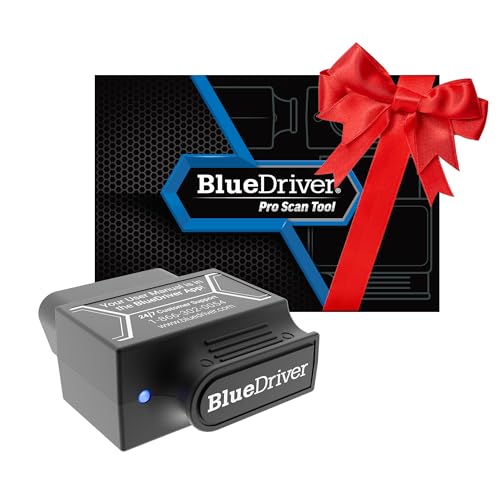
BlueDriver stands out for its subscription-free model and professional-grade diagnostics. It reads and clears codes, and offers enhanced diagnostics that bring repair insights usually reserved for shop tools. Users gain access to unlimited repair reports with potential causes and fixes, plus real-time health monitoring via live data. The tool supports a broad range of vehicle makes and models manufactured after 1996, including ABS, SRS, and other systems in many cases. BlueDriver integrates with mobile devices through a robust companion app and is widely used by enthusiasts who want deeper diagnostic information without ongoing fees.
FOXWELL NT301 OBD2 Scanner

The NT301 is designed for professional-grade diagnostics with a focus on readability and data presentation. It enables users to read DTCs, check emission readiness, and turn off the CEL with proper post-repair steps. It supports live data streaming and graphing to help pinpoint issues, but it does not cover ABS, TPMS, or other systems in depth. It’s a practical option for those who want reliable fault code retrieval and a solid pool of live data while avoiding multifunctional complexities.
MOTOPOWER MP69033 Car OBD2 Scanner

The MP69033 provides broad OBD-II protocol support across US, EU, and Asian vehicles from 1996 onward. It features a 2.8-inch LCD with white backlight for clear code reading and real-time data display, along with a built-in DTC library. The device powers from the vehicle’s OBD-II port, eliminating the need for a separate power source. It emphasizes practicality for everyday use and offers multilingual support, making it a versatile choice for users who want a dependable, single-screen diagnostic experience.
FOXWELL NT604 Elite OBD2 Scanner

The NT604 Elite adds 5-in-1 capabilities beyond standard OBDII scanning, including ABS and SRS (airbag) diagnostics, along with transmission checks. It ships with up-to-date software and is designed to work out of the box, helping car owners identify the root causes of warnings before visiting a shop. While it provides robust system coverage for common diagnostic tasks, it notes that certain data and clearing functions may be limited for airbags in some scenarios. The NT604 Elite is a strong option for owners seeking a broader diagnostic reach in one handheld device.
Buying Guide: Key Purchase Considerations
- Vehicle compatibility and protocols: Ensure the scanner supports the OBD-II standards used by your vehicle (CAN, KWP2000, ISO9141, J1850, etc.). Some models list broad compatibility, while others focus on specific regions or vehicle classes.
- Core functions: Decide if you need basic code reading/clearing or more advanced features like live data streaming, freeze-frame data, I/M readiness, and readiness for smog tests. Some models also include battery testing, service resets, or maintenance functions; verify which functions apply to your needs.
- Live data and graphing: Real-time sensor data helps diagnose conditions beyond codes. Graphing can be especially beneficial for identifying trends and faulty sensors over time.
- Interface and ease of use: Look for intuitive menus, a clear screen, and straightforward code definitions. Small form factors are convenient for handheld use, but ensure the display is legible in various lighting conditions.
- Power source: Most OBD-II scanners draw power from the vehicle; some may require batteries for standalone use. Confirm the device’s power requirements to avoid compatibility issues.
- Data access and updates: Some devices (notably premium models) provide repair reports or live data integration with mobile apps. Check whether updates and app access are included or require a subscription.
- Support and coverage: Larger brands tend to offer more expansive DTC databases, broader system coverage (ABS, SRS, transmission), and better customer support. If you frequently diagnose diverse vehicles, consider models with broader system support.
- Ease of clearance: If you plan to clear codes after repairs, verify that the scanner can clear the codes and reset relevant monitors without requiring a professional tool or dealer work.
- Price-to-feature balance: Entry-level models are typically affordable and excellent for basic needs, while higher-end units provide advanced diagnostics at a higher price. Align features with your typical use cases and vehicle portfolio.
- App ecosystem and third-party integration: For some scanners, compatibility with third-party apps enhances data interpretation and sharing. Confirm app compatibility and feature access before purchase.