Looking to upgrade your car’s dashboard with seamless screen mirroring, wireless CarPlay, and easy HDMI compatibility? This guide highlights five standout options that fit a range of budgets and vehicles, delivering wireless connectivity, quick setup, and reliable performance. Each pick supports iPhone or Android devices, mirrors content, and transforms your driving experience with hands-free navigation, streaming, and calls. Read on to compare features, setup, and what to consider when choosing the right solution for your car.
Summary of chosen products
| Product | Brand | Type |
|---|---|---|
| Joywind 3-in-1 Wireless Car Adapter | Joywind | Wireless CarPlay + Android Auto + HDMI |
| Coliatik 3-in-1 Wireless CarPlay Adapter | Coliatik | Wireless CarPlay + AirPlay + Mirror Link |
| OTTOCAST Mirror Touch | OTTOCAST | Wireless CarPlay + Bi-directional Mirroring |
| GETPAIRR 4-in-1 Car TV Mate Pro Max | GETPAIRR | Wireless CarPlay + Android Auto + HDMI |
| VNILRGLE 4-in-1 Wireless CarAdapter | VNILRGLE | Wireless CarPlay + Android Auto + Android TV features |
Joywind 3-in-1 Wireless CarPlay Adapter

The Joywind 3-in-1 device combines CarPlay, Android Auto, and an HDMI input in a single plug-and-play package. It upgrades factory stereos to support wireless CarPlay and Android Auto, while providing a dedicated HDMI port for external streaming devices. Users can instantly access maps, music, calls, and voice assistants with minimal setup. It also enables real-time screen mirroring from compatible smartphones, turning the car display into a mobile entertainment hub on longer trips.
Key features include effortless plug-and-play installation via the car’s USB port, automatic reconnection for wireless CarPlay/Android Auto, and support for streaming services on HDMI-connected devices. The solution is designed to minimize cable clutter and maximize convenience, enabling passengers to enjoy streaming services and gaming in vehicles that previously required wired connections.
Ideal use cases include road trips, waiting areas with passengers, and daily commutes where wireless connectivity and HDMI flexibility are desirable. The Joywind option emphasizes a streamlined setup and quick access to entertainment and navigation tools, making it a strong all-around choice for users seeking a versatile car multimedia upgrade.
Coliatik 3-in-1 Wireless CarPlay Adapter

The Coliatik adapter adds wireless functionality to wired Apple CarPlay systems and supports Wireless CarPlay, AirPlay, and Mirror Link in one compact unit. It promises a fast, stable connection via 2.4/5 GHz WiFi and Bluetooth 5.0 for smooth streaming, navigation, and hands-free calling without cables. The plug-and-play design requires no extra apps or tools, making it a practical option for daily driving where simplicity matters.
With reliable connectivity and broad compatibility, Coliatik focuses on an easy integration path—transforming a traditional wired CarPlay setup into a wireless, more flexible interface. It’s well-suited for drivers who want less clutter and quicker access to maps, music, and apps on their car’s display.
Consideration points include ensuring your vehicle supports wired CarPlay, verifying compatibility with your iPhone or Android device, and noting that no additional tools are needed after installation for everyday use.
OTTOCAST Mirror Touch

OTTOCAST offers a wireless CarPlay experience with bi-directional phone mirroring, enabling control from the car screen for compatible devices. This approach emphasizes wireless freedom for 2016+ cars, supporting a seamless transition from wired CarPlay to wireless operation. It can mirror entertainment and navigation content, potentially turning the car into a larger local display for compatible apps and media streaming when connected to the right sources.
Highlights include a focus on wireless CarPlay for modern vehicles, a design that aims to minimize the need for cables, and the potential to mirror video content from your phone to the car display. It’s positioned as a safer, more convenient option for drivers who want to keep the dashboard neat while enjoying enhanced media capabilities.
Purchase considerations include compatibility with your phone model, the vehicle’s infotainment system’s support for wireless CarPlay, and expectations around video mirroring and app compatibility on the car screen.
GETPAIRR 4-in-1 Car TV Mate Pro Max
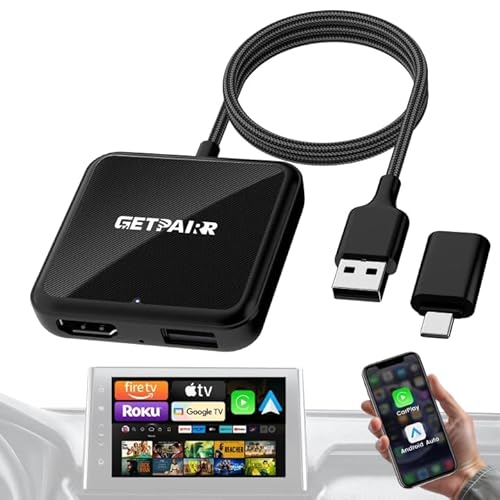
The GETPAIRR 4-in-1 Car TV Mate Pro Max blends Wireless CarPlay, Android Auto, and HDMI functionality into one compact dongle. It emphasizes faster auto-reconnect, steadier connections, and true plug-and-play operation for maps, music, calls, and voice control. The HDMI output converts the car screen into a TV-like display when using streaming devices, with support for popular services on up to 2K/60Hz. The device also acts as a screen mirroring adapter for real-time content from your phone.
Key considerations include HDMI compatibility with your display, whether you use Fire TV Stick or similar streaming devices, and the requirement for hotspot or Wi-Fi to access online apps. It is suitable for users who want a larger screen experience on long trips and in-car entertainment options beyond navigation alone.
VNILRGLE 4-in-1 Wireless CarPlay Adapter
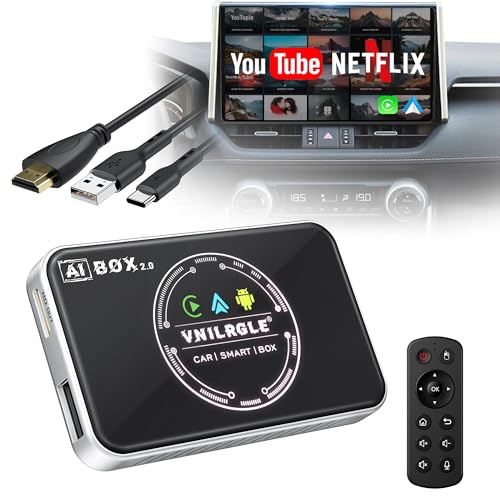
The VNILRGLE 4-in-1 box combines Wireless CarPlay, Android Auto wireless, and includes Android 12 features with pre-installed apps like Netflix and YouTube. It enables in-car streaming directly to the display and supports downloading additional apps from Google Play and the App Store. It requires that the vehicle already has wired CarPlay or Android Auto and includes versatile cables for broad device compatibility.
From a usability perspective, this option emphasizes embedding entertainment directly into the car’s infotainment system, allowing streaming without extra devices. It’s a fit for users who want to expand their car’s capabilities with a multipurpose, app-friendly unit that handles both navigation and media streaming.
Buying Guide
Key purchase considerations help buyers pick a solution that matches their car, phone, and usage patterns. Consider compatibility, ease of setup, and the primary use case—navigation, streaming, or mirroring.
- Vehicle compatibility: Ensure your car supports CarPlay or Android Auto wired configurations if the device relies on a wired port. Some adapters enable wireless CarPlay/Android Auto, while others require a wired foundation.
- Wireless vs. wired: If you want true wireless operation, prioritize adapters advertised as wireless CarPlay/Android Auto with stable Wi‑Fi and Bluetooth connections. For HDMI streaming, verify HDMI output compatibility and display resolution.
- Video and streaming capabilities: If streaming services are a priority, confirm supported apps and maximum resolutions (2K/60Hz or 1080p) and whether the car screen can control those HDMI devices.
- Bi-directional mirroring and control: Some models offer bi-directional mirroring, which can improve navigation and media control but may introduce latency depending on the car’s hardware and Wi‑Fi network.
- Setup and maintenance: Look for true plug-and-play designs with automatic reconnection, minimal app requirements, and easy reboot or reset processes in case of connectivity issues.
- Power and connectivity stability: Check Wi‑Fi bands (2.4/5 GHz) and Bluetooth versions; these influence latency, audio quality, and reliability during drives.
- Security and privacy: Wireless devices access your car’s display and phone interface; choose trusted brands with reputable firmware updates and clear usage guidelines.
- Future-proofing: Some adapters support a broader ecosystem (iPhones, Android models, streaming devices) and may receive firmware updates that extend compatibility with newer phones or operating systems.
In summary, the best choice depends on whether you prioritize a single, unified wireless experience, or a flexible setup that leverages HDMI for larger screens or streaming devices. For daily driving with minimal fuss, a plug-and-play, wireless CarPlay/Android Auto solution is typically preferred. For road trips and passenger entertainment, devices offering HDMI expansion and robust app support provide additional options at the dash.