Transform long drives into a true in-car cinema with high-resolution headrest monitors. This guide spotlights five top Android-based rear TV screens designed to keep passengers entertained with 4K capable playback, wireless mirroring, and rich app ecosystems. Each model supports WiFi, Bluetooth, HDMI, USB, and 4G+64GB storage options to handle streaming, local video, and apps. Whether you’re outfitting a family SUV or a commuter sedan, these screens offer a blend of sharp visuals, responsive touch, and flexible connectivity for backseat entertainment.
Summary table of selected products:
- WONNIE 13.3″ Car TV Headrest Monitor — 13.3″ HD IPS touchscreen, Android 13, OTA updates, wireless mirroring.
- WONNIE 13.3″ Car TV for Back Seat — 13.3″ HD IPS touchscreen, Android 13, OTA updates, wireless mirroring.
- WONNIE 16″ Car TV Headrest Monitor — 16″ FHD IPS touchscreen, Android 13, OTA updates, wireless mirroring.
- AINAVI 15.6″ Android Car TV Headrest Monitor — 15.6″ touchscreen, Android 13, wireless mirroring, 4K playback.
- AINAVI 10.8″ Android Back Seat Car TV — 10.8″ touchscreen, Android 13, wireless mirroring, 4K playback support.
WONNIE 13.3″ Car TV Headrest Monitor

The 13.3-inch headrest screen offers a vibrant 1920×1200 IPS display with 4K playback capability. An Android 13 system powers a wide app ecosystem through Google Play and APKPure, with OTA updates ensuring the device remains current. The touch screen delivers responsive navigation for backseat users, and built-in WiFi or mobile hotspots enable streaming from popular services. Wireless Miracast and AirPlay support enable easy screen sharing from compatible Android and iOS devices. This model suits families seeking a compact, feature-rich rear entertainment option.
WONNIE 13.3″ Car TV For Back Seat

This alternative 13.3″ model mirrors the same core strengths: a 1920×1200 IPS touchscreen, Android 13 with OTA updates, and seamless wireless Mirroring via Miracast/AirPlay. It supports 5G/2.4GHz WiFi for streaming and app downloads, making it capable of Netflix, YouTube, Disney+, and more. The remote-friendly interface and compact size make it ideal for smaller vehicles or for households that want two backseat displays in one vehicle. The device emphasizes stability through its processor and GPU for crisp video playback and smooth touch control.
WONNIE 16″ Car TV Headrest Monitor
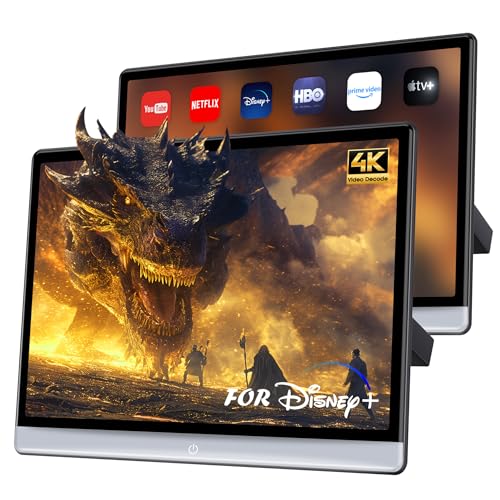
The 16-inch headrest monitor stands out with a larger display and a 1920×1200 IPS touchscreen. It provides 4K playback support and Android 13 with OTA updates, ensuring access to a broad app library and ongoing improvements. Wireless mirroring via Miracast/AirPlay keeps apps and content synchronized with smartphones, while the built-in WiFi and Bluetooth enhance connectivity for streaming, file transfers, and peripheral devices. Its bigger screen is particularly appealing for families with multiple passengers who crave a more cinematic experience on the road.
AINAVI 15.6 Inch Android Car TV Headrest Monitor

This 15.6-inch Android 13 car headrest monitor emphasizes a robust multimedia experience with 4K video decoding and 1920×1080 resolution on a vibrant IPS screen. It supports 5G/2.4GHz WiFi and Miracast/AirPlay for wireless screen sharing, along with the MyCar Link app for synchronized control between phone and screen. The device also highlights Google Play access for apps and media, broadening the entertainment options for backseat passengers. Storage is generous, and the OTA updates help maintain long-term performance and compatibility with newer apps and streaming services.
AINAVITO 13.5 Inch Android Car Headrest Monitor

The 13.5-inch Ultra IPS screen delivers 4K decoding and 1920×1280 resolution for vivid visuals. Wireless mirroring (AirPlay for iOS and Miracast for Android) enables easy sharing from mobile devices. The device runs Android 13 with the Google Play Store access, offering a wide range of apps and games. The MyCar Link app provides remote control and screen synchronization between the phone and the car TV, which can simplify setup for families and ensure kids enjoy synchronized playback during trips. Storage is ample with 4GB RAM and 64GB ROM in the base configuration.
Buying Guide: Key Purchase Considerations For Rear Car Screens
- Display size and resolution: Larger screens provide a more immersive experience, while high resolution (4K decoding support) ensures crisp video. Consider headrest depth and vehicle size to avoid blind-spot interference.
- Operating system and app access: Android-based headrests with Google Play access enable streaming apps, offline downloads, and games. OTA updates help maintain compatibility with new apps and services over time.
- Connectivity and streaming capabilities: Look for 5G/2.4GHz WiFi, hotspot compatibility, HDMI/USB inputs, and Bluetooth for peripheral devices. Wireless screen mirroring simplifies sharing content from phones and tablets.
- Content organization and memory: Built-in RAM and ROM determine how many apps, videos, and downloads you can store offline. Consider microSD/USB expansion if available.
- Remote control and user experience: MyCar Link or similar remote apps streamline control for backseat passengers. A responsive touchscreen and intuitive UI reduce driver distraction.
- Durability and safety: Ensure an installation that minimizes heat buildup and keeps wires tidy. Check power requirements and compatibility with your vehicle’s 12V system.
- OTA updates and long-term support: Devices with automatic updates provide improved stability, new features, and better security over time.
- Warranty and after-sales support: Check the seller’s return policy and warranty duration to protect against defects or compatibility issues with vehicles.
In choosing a rear car screen, consider whether your priority is the largest possible display for distraction-free viewing, or a compact model that preserves passenger space and wire management. For households with multiple backseat viewers, models with strong app ecosystems, reliable wireless mirroring, and robust streaming support tend to offer the best long-term value. If you value offline content, ensure adequate local storage and app support for offline downloads. Finally, verify compatibility with your vehicle’s media ports and power delivery to avoid installation challenges.