Choosing the right wireless CarPlay/Android Auto box can upgrade your in-car experience with seamless connectivity, streaming, and app access. The following picks emphasize strong wireless performance, compatibility with factory systems, and robust multimedia capabilities. This guide helps readers compare models across features like 4K video, Wi‑Fi standards, storage, and Android OS versions. Each product offers plug‑and‑play installation and the potential to transform a dated infotainment setup into a smart, connected cockpit.
| Product | Brand | Key Benefit |
|---|---|---|
| FAIMEE AI Box Wireless CarPlay & Auto Adapter | FAIMEE | Wireless CarPlay/Android Auto, dual‑band WiFi, 4K video, Android 12 |
| ZYW Magic AI Box Wireless CarPlay Adapter | ZYW | 4K streaming, WiFi 6, robust temp range, 32GB storage |
| LAMTTO 4‑in‑1 Wireless CarPlay/Android Auto | LAMTTO | Remote control, app download, Netflix/YouTube compatibility |
| OneCarStereo CarPlay AI Box HE Pro | One Car Stereo | Android 13, 8‑core chip, 4G/dual Wi‑Fi, OTA |
| ATOTOOUT Magic Box CB6D | ATOTOOUT | Android 13, 8GB/128GB, 4G/Wi‑Fi, GPS, OTA |
Note: Each product supports wireless CarPlay and/or Android Auto, with varying OS versions, storage, and connectivity options. When evaluating, consider device compatibility with your vehicle’s OEM system, your preferred streaming apps, and where you plan to place the device for optimal signal reception.
FAIMEE AI Box Wireless CarPlay & Auto Adapter

The FAIMEE AI Box upgrades wired CarPlay to a wireless experience and adds Android Auto support. It runs Android 12 and includes dual‑band WiFi (2.4GHz/5GHz) for faster streaming and navigation. Bluetooth 5.0 ensures stable hands‑free calls and music streaming, while USB and SD card support expand multimedia options. The device targets drivers who want a simple, plug‑and‑play solution without sacrificing media flexibility. It is compatible with iPhone models that support Wireless CarPlay and Android devices running Android 11 or newer, enabling a broad range of smartphones to connect with minimal setup.
Key considerations:
- Pros: Strong wireless CarPlay/Android Auto performance, 4K video playback, broad media compatibility.
- Potential limitations: Some apps may restrict certain features during car use, depending on OS and vehicle integration.
- Ideal user: Those seeking a straightforward upgrade for wired CarPlay systems with robust streaming and local media options.
ZYW Magic AI Box Wireless CarPlay Adapter

The ZYW aibox emphasizes lag‑free 4K streaming and WiFi 6 connectivity, designed for factory wired CarPlay/Android Auto vehicles. Its upgraded thermal design helps prevent overheating, supporting stable 4K playback for Netflix and YouTube. The device also runs Android 10.0, enabling app downloads and a traditional app ecosystem, with 32GB storage to house favorites. It’s tested for reliable operation across wide temperature ranges, making it a solid choice for hot or cold climates and daily commutes alike.
Key considerations:
- Pros: 4K streaming and WiFi 6 for smoother video and apps, robust build for temperature extremes.
- Cons: Some OEM vehicles may require verification of compatibility with wired CarPlay systems before purchase.
- Ideal user: Those who want strong streaming performance and a broad Android app experience in the car.
LAMTTO 4‑in‑1 Wireless CarPlay/Android Auto

The LAMTTO box combines Wireless CarPlay, Wireless Android Auto, and a full Android OS in one unit. It supports app downloads from Google Play, including Netflix, YouTube, TikTok, and other services, stored on its internal memory. A remote control adds convenience for front and rear passengers, simplifying navigation and media control away from the main display. This unit is well suited for users who want a centralized smart cockpit where streaming apps and maps coexist with CarPlay/Android Auto functionality.
Key considerations:
- Pros: Convenience of a remote, broad app library, and dual‑platform support.
- Cons: Remote functionality can be limited by app permissions for Netflix and YouTube in some setups.
- Ideal user: Families or frequent travelers seeking flexible in‑car entertainment and navigation options.
OneCarStereo CarPlay AI Box HE Pro
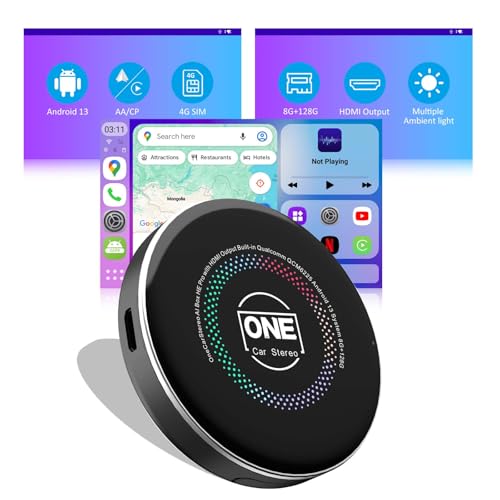
The HE Pro model runs Android 13 on a Qualcomm octa‑core platform, delivering fast app loading and smooth multitasking. It supports wireless CarPlay and Android Auto, with options to use online content via phone hotspot, in‑car Wi‑Fi, or a 4G SIM. The device also provides video output mirroring to rear displays and supports OTA updates. However, vehicle compatibility should be confirmed—particularly for older models or cars with specific display configurations—before purchase to ensure full functionality.
Key considerations:
- Pros: Modern CPU, broad OS support, and multiple connectivity options for online content.
- Cons: Some models may have compatibility caveats with particular car makes or trims.
- Ideal user: Tech enthusiasts who want the latest Android features and flexible video output in a car environment.
ATOTOOUT Magic Box CB6D

The ATOTOOUT CB6D runs Android 13 and includes built‑in 4G, Wi‑Fi, and dual Bluetooth, plus 8GB RAM and 128GB storage. It offers built‑in GPS, OTA updates, and a variety of media options through microSD playback. The device supports wireless CarPlay/Android Auto and can deliver online content through multiple networks, making it a versatile option for those who want a fully connected infotainment experience. As with other devices, confirm that your car’s display supports the CarPlay/Android Auto pathway used by the box for best results.
Key considerations:
- Pros: High hardware specs, built‑in GPS, and strong network options for streaming.
- Cons: Higher hardware complexity may require careful setup for best performance.
- Ideal user: Drivers who want robust performance, GPS functionality, and OTA upgrades in a single box.
Buying Guide: Key Purchase Considerations
- Compatibility: Check whether your vehicle uses wired CarPlay/Android Auto and whether the device supports your car’s screen type. Some models work best with OEM wired CarPlay, while others can replace or augment the interface entirely.
- Operating System and Apps: Consider the Android OS version (10, 12, or 13) and whether you want access to Google Play for apps like Netflix, YouTube, Spotify, and maps. Storage capacity (8GB/128GB vs 32GB) impacts how many apps you can install locally.
- Connectivity: Look for dual‑band WiFi (2.4GHz/5GHz) and Bluetooth 5.0 or newer for faster pairing and stable media/audio streaming. Wi‑Fi 6 is a plus for smoother video streaming in cars with reliable network coverage.
- Video and Multimedia: If video playback is important, confirm 4K support and how well the device handles streaming apps like Netflix, YouTube, or TikTok. Be aware of any app restrictions depending on the car’s display and software.
- Hardware and Longevity: Devices with robust cooling, heated operation ranges, and OTA updates tend to last longer and stay compatible with evolving apps and streaming services.
- Safety and Use: Some devices offer split‑screen display or passenger mode to keep the driver focused. Ensure that usage aligns with local laws and promotes safe driving practices.
- Installation and Support: Confirm plug‑and‑play ease and check the vendor’s return policy and customer support quality, especially if you need help with vehicle compatibility or firmware updates.
The options above span a range of budgets and priorities, from easy plug‑and‑play upgrades to more customizable, full Android experiences. When evaluating, map your needs to a few core questions: Do you prioritize streaming apps (Netflix, YouTube, TikTok), navigation reliability, or the ability to install additional apps? Is 4K video a must, or is stable music playback and maps more important? Finally, verify vehicle compatibility before purchase to ensure a smooth integration into your driving routine.